
Why Clients Don't Trust Your SEO Report — And What Actually Works
By Angel Guzman · Founder, SearchProof · June 2026
You send the monthly SEO report. Organic traffic is up 34%. Rankings improved for eight target keywords. The numbers are real, and you know it.
Your client responds: “These look good, but how do I know they're accurate?”
It's a frustrating reply — especially when you've genuinely done the work. But it's also a fair question. SEO reports are easy to fake. Screenshots take thirty seconds to edit. A PDF can show whatever numbers you want. And if a client has been burned by a dishonest agency before, they've learned to be skeptical by default.
The fix is simpler than a better template: share data your client can verify directly from Google — not an export you control.
Most guides on creating an SEO report for clients focus on what to include and how to format it. This one covers that — and then tackles the bigger problem those guides skip: how to make your numbers verifiable, not just presentable.
What a Strong SEO Report for Clients Should Include
The core of any good SEO progress report hasn't changed much. A solid monthly report covers:
- Organic traffic — total sessions from search and the trend over the reporting period
- Keyword rankings — positions for target terms and changes since last month
- Impressions and clicks — pulled from your Google Search Console report, showing how often your pages appear in search and how often people click
- Top pages — which URLs are driving the most organic visits
- Conversions — organic-attributed leads, signups, or purchases where trackable
- Technical health — crawl errors, Core Web Vitals flags, or indexing issues that came up during the period
A Google Search Console Performance report export handles the first three. GA4 or your analytics platform covers the rest. Keep the format clean, lead with what moved, and explain why it matters in plain language — not SEO jargon.
Most reporting guides stop here. They give you a template, tell you to add your branding, and call it done. That's a fine starting point. But it leaves the actual trust problem completely unaddressed.
The Problem With SEO Reports Nobody Talks About
Here's what the “how to create an SEO report for clients” content category consistently ignores: your report format doesn't matter if the client can't verify the underlying data.
Screenshots are trivially easy to edit. Any competent person can open a PNG in an image editor and change a number in under a minute. PDFs are marginally harder to tamper with, but not by much. Even shared dashboard links can be configured to show cherry-picked date ranges or exclude unflattering pages.
Clients — especially ones who've worked with agencies before — know this. A bad experience with a previous provider who inflated numbers and then disappeared has made a lot of buyers permanently cautious. They're not necessarily questioning your honesty. They've just learned that “trust me” isn't a substitute for evidence.
This is the gap that no SEO progress report template addresses. They all optimize for how the report looks. None of them optimize for whether the data can be independently confirmed.
That's a meaningful distinction. A beautifully formatted PDF with numbers a client can't verify is still just a claim. A live page pulling directly from Google is proof.
What Verified SEO Reporting Looks Like
Verified reporting means the client doesn't have to trust your export — they can check the source themselves.
The standard for this is data pulled from Google Search Console directly via OAuth authentication — a secure protocol where Google grants read-only access to your data without exposing your credentials. When a report is backed by a live OAuth connection:
- Google authenticates the data, not you
- You don't control the pipeline between GSC and what the client sees
- The numbers can't be modified after the fact
- The client sees the same data you see, served by the same source
When a client asks “how do I know these numbers are real?” the answer becomes concrete: “Because Google is serving them directly. The connection is authenticated by Google — I don't touch the data.”
That changes the dynamic of the entire client relationship. You go from asking for trust to offering verification. That's a different kind of SEO win — not just good results, but provably good results.
How to Share Verified Google Search Console Data With Clients
SearchProof is built specifically for this.
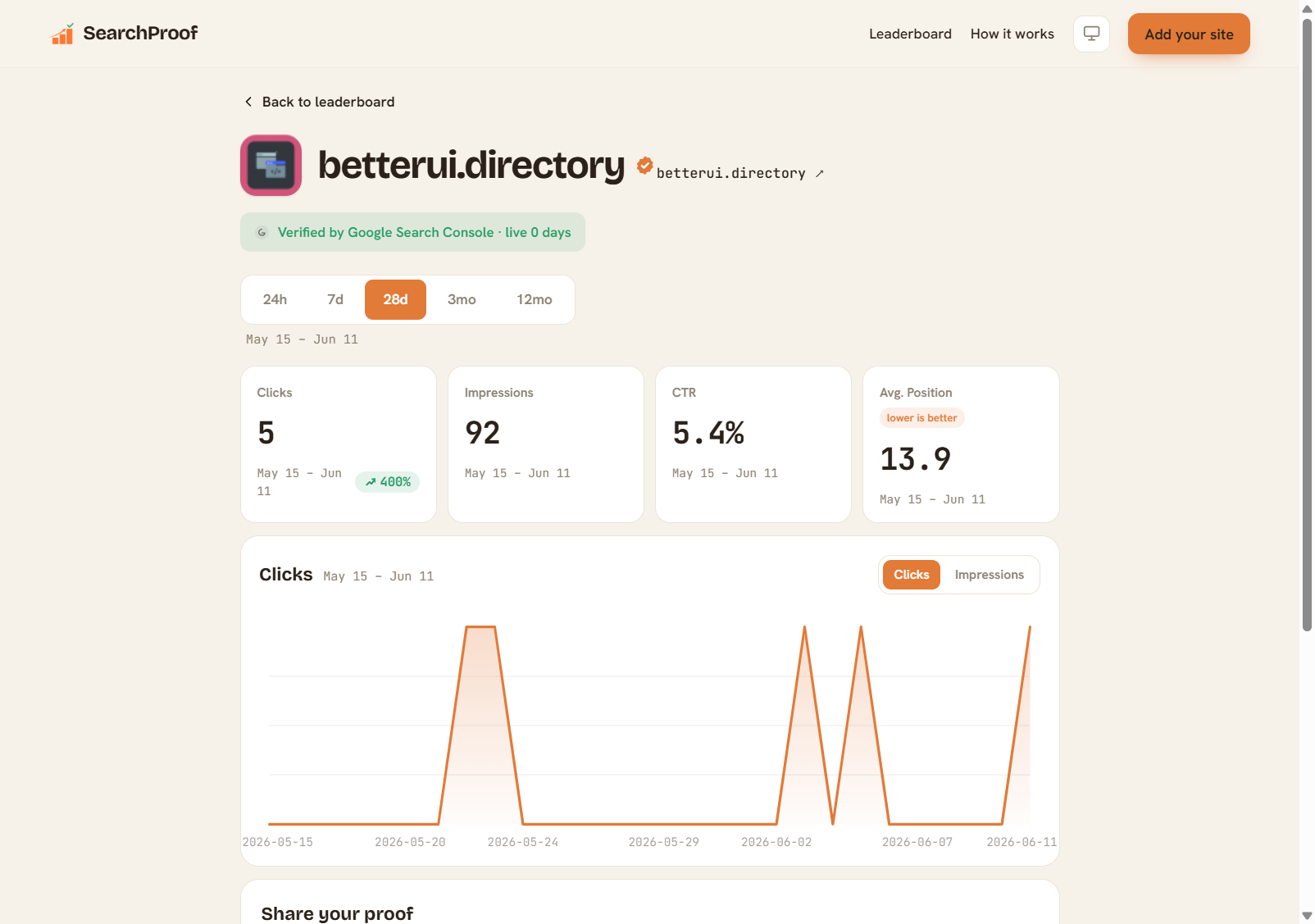
Connect your Google Search Console property via OAuth, and SearchProof generates a public Site Page — a live URL showing your verified GSC metrics: impressions, clicks, average position, and organic traffic trend over time. The data is pulled directly from Google's API on every load.
Your client gets a URL they can bookmark and share. It updates automatically as your GSC data updates. They don't need a SearchProof account to view it — the page is public by design. And because the connection is OAuth-authenticated, the data carries an implicit guarantee: this is what Google reports, not what you've chosen to show.
For an SEO professional, this shifts the whole conversation. Instead of sending a monthly PDF and waiting for a skeptical follow-up email, you send a link:
“Here's our verified progress page — it pulls live from Google Search Console. You can bookmark it and check it anytime.”
That's a different kind of client relationship. One where the proof is always available, not just at reporting time. If you want a public example before sending your own page, point clients to the SearchProof Leaderboard.
The Modern SEO Report for Clients: Putting It Together
A reporting setup that actually builds client trust has three layers:
1. A verified public Site Page
This is the foundation. An OAuth-connected, live page from SearchProof answers the “are these numbers real?” question permanently. It's not a screenshot, not a PDF, not a dashboard you control — it's a direct view of your GSC data, publicly accessible.
2. A monthly narrative
The verified data is the proof. Your analysis is the value. Each month, add context: what moved, why it moved, what you're working on next, and how it connects to the client's business goals. This is where your expertise shows up — the Site Page just confirms you're not making it up.
3. Conversion context
Tie organic traffic to outcomes. A google search console report that shows 5,000 impressions means more when you can connect it to 12 demo requests or 40 signups. Use GA4, your CRM, or whatever tracking the client has in place to close that loop.
Together, these three layers make for a client report that holds up to scrutiny — and one that's considerably harder to argue with than a PDF you emailed on a Friday afternoon.
Frequently Asked Questions
What should an SEO report for clients include?
At minimum: organic traffic trends, keyword rankings, impressions and clicks from Google Search Console, top-performing pages, and a brief narrative explaining what changed and why. Add conversions where trackable.
How often should I send SEO progress reports?
Monthly is standard. For clients in fast-moving niches or those new to SEO, a brief mid-month check-in can help prevent anxiety between reports.
How do I prove my SEO results are real?
Use OAuth-authenticated data pulled directly from Google Search Console. Tools like SearchProof generate a public, verified page backed by a live GSC connection — the data comes from Google, not from a screenshot or export you control.
What's the difference between impressions and clicks in a Google Search Console report?
Impressions count how many times your pages appeared in search results. Clicks count how many times someone actually visited your page from those results. Both matter: impressions show search visibility, clicks show whether that visibility is converting to traffic.
The Bottom Line
The best SEO report for clients isn't one with better formatting. It's one where the client doesn't need to take your word for it — because the data is verified by Google, accessible anytime, and impossible to fake.
Screenshots get questioned. PDFs get doubted. A live, OAuth-connected page from Google Search Console doesn't.
Create your verified Site Page at search-proof.com — free, takes under two minutes. Drop the link in your next client report and see how the conversation changes.